





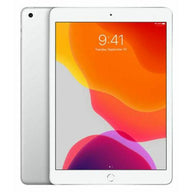


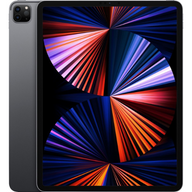




The Definitive Plug Certified iPad & Accessory Compatibility Guide
Updated on | 9 mins readThe Definitive Plug Certified iPad & Accessory Compatibility Guide
If you are evaluating which iPad to purchase, you have likely run into a frustrating roadblock: figuring out exactly which Apple Pencil or keyboard works with the specific model you want. You are not alone. Every month, over 16,000 people search for apple pencil compatibility simply because the ecosystem has grown incredibly complex.
Whether you are deciding between an M2 iPad Pro or a budget-friendly 10th-generation iPad, matching your device with the right accessory is critical to your workflow. This guide serves as your authoritative resource for demystifying accessory pairings for all Plug Certified iPads. We will break down exactly which tools work together, how to troubleshoot common connection issues, and how to choose the right setup for your specific needs.
Decoding Apple Pencil Compatibility
Apple currently offers four distinct versions of the Apple Pencil. Because they use different charging methods and pairing protocols, they are not universally compatible. When you buy a Plug Certified iPad, you need complete confidence that your stylus will connect seamlessly. Here is a comprehensive apple pencil comparison to guide your decision.
Apple Pencil Pro
Designed for the most demanding creative professionals, the Apple Pencil Pro introduces advanced features like haptic feedback, a new squeeze gesture for tool palettes, a barrel roll sensor for precise brush control, and Find My integration.
- Compatible Plug Certified iPads:
- iPad Pro 13-inch (M4)
- iPad Pro 11-inch (M4)
- iPad Air 13-inch (M2)
- iPad Air 11-inch (M2)
Apple Pencil (2nd Generation)
For years, this has been the gold standard for creatives, offering magnetic attachment, wireless pairing and charging, and pressure sensitivity.
- Compatible Plug Certified iPads:
- iPad Pro 12.9-inch (3rd, 4th, 5th, and 6th generations)
- iPad Pro 11-inch (1st, 2nd, 3rd, and 4th generations)
- iPad Air (4th and 5th generations)
- iPad mini (6th generation)
Apple Pencil (USB-C)
The USB-C model provides a more affordable entry point. It attaches magnetically for storage but requires a USB-C cable for pairing and charging. While it offers excellent tilt sensitivity, note that it lacks the pressure sensitivity of the 1st, 2nd, and Pro generations.
- Compatible Plug Certified iPads:
- Any Plug Certified iPad featuring a USB-C port, including iPad Pro models (up to M2/M4), iPad Air (4th Gen and later), iPad mini (6th Gen), and iPad (10th Gen).
Apple Pencil (1st Generation)
The original Apple Pencil charges via a Lightning connector and remains the essential tool for older iPad models.
- Compatible Plug Certified iPads:
- iPad (6th, 7th, 8th, and 9th generations)
- iPad Air (3rd generation)
- iPad mini (5th generation)
- Note on ipad 10 pencil compatibility: The 1st Generation Pencil works with the iPad (10th Gen), but requires a USB-C to Apple Pencil Adapter to pair and charge.
Keyboard Compatibility Matrices
Transforming your iPad into a laptop replacement requires the right keyboard. Apple’s keyboard lineup is strictly tied to the physical dimensions and Smart Connector placements of specific iPads.
Magic Keyboard
The Magic Keyboard features a floating cantilever design, backlit keys, and a built-in trackpad. It is the ultimate productivity tool. If you are looking to purchase an ipad pro magic keyboard, ensure you are matching it to the correct generation.
- Compatibility:
- iPad Pro 11-inch (1st through 4th Gen)
- iPad Pro 12.9-inch (3rd through 6th Gen)
- iPad Air (4th and 5th Gen)
Magic Keyboard Folio
Specifically designed for the 10th-generation iPad, this two-piece design features a detachable keyboard and a protective back panel with a built-in kickstand.
- Compatibility:
- The apple magic keyboard folio for ipad 10th generation works exclusively with the iPad (10th generation).
Smart Keyboard Folio
A lightweight, trackpad-free alternative to the Magic Keyboard that protects both the front and back of your device while offering a great typing experience.
- Compatibility:
- iPad Pro 11-inch and 12.9-inch (older generations)
- iPad Air (4th and 5th generations)
Making the Right Purchase Decision by Use Case
Navigating specifications is only half the battle; the real evaluation comes down to how you plan to use your technology. Knowing what to check when buying used ipad models helps ensure you get a device certified by Plug that perfectly aligns with your lifestyle.
For the Digital Artist or DesignerYou need uncompromising precision. We recommend pairing a Plug Certified iPad Pro (M2 or M4) with the Apple Pencil Pro or 2nd Generation. The pressure sensitivity and minimal latency are non-negotiable for professional illustration.
For the Student on a BudgetYour priority is note-taking and document editing without breaking the bank. A Plug Certified iPad (9th or 10th Generation) paired with an Apple Pencil (USB-C) or even exploring high-quality apple pencil alternatives will serve perfectly. Add a third-party Bluetooth keyboard to round out a highly capable, budget-friendly study station.
For the Mobile ProfessionalIf your iPad is replacing your laptop, focus on the keyboard. A Plug Certified iPad Air (5th Gen) paired with a Magic Keyboard gives you the trackpad functionality necessary for heavy email management, spreadsheet navigation, and multitasking, while keeping the overall footprint lighter than a MacBook.
Troubleshooting Common Accessory Connection Issues
Even with perfectly matched hardware, Bluetooth and magnetic connections can occasionally falter. Before assuming your accessory is broken, walk through these quick diagnostic steps.
- Verify Your iPad's Software: Apple frequently releases firmware updates for accessories that are bundled into iPadOS updates. Ensure your Plug Certified iPad is running the latest OS.
- Clean the Smart Connector: If your Magic Keyboard is intermittently disconnecting, use a microfiber cloth to gently clean the three magnetic pins on the back of your iPad and the corresponding pins on the keyboard.
- Reset the Bluetooth Handshake: If your Apple Pencil refuses to draw despite showing a full battery, you likely need a quick reset. You can learn exactly how to reset apple pencil connections by "forgetting" the device in your Bluetooth settings, physically reconnecting the stylus, and allowing the pairing prompt to reappear.
Frequently Asked Questions (FAQ)
Does Plug test accessory compatibility before shipping?
Absolutely. Every device sold by Plug undergoes a rigorous testing process to ensure all ports, Bluetooth antennas, and magnetic Smart Connectors function flawlessly. When you buy a Plug Certified device, you are buying guaranteed performance.
Can I use an iPhone charger to charge my Apple Pencil?
It depends on the Pencil. The 1st Generation Apple Pencil can be charged using an iPhone Lightning cable via the female-to-female adapter included in its original packaging. The newer USB-C Pencil requires a standard USB-C cable, and the 2nd Generation and Pro models only charge wirelessly by attaching to the side of a compatible iPad.
Are third-party accessories covered under warranty?
While third-party accessories have their own manufacturer warranties, your primary device is protected by Plug's 12-Month Warranty. This guarantees that your iPad will continue to interface properly with compatible accessories for a full year.
What if I buy the wrong accessory for my Plug Certified iPad?
We understand that compatibility matrices can be dense. If you accidentally purchase a mismatched accessory or device from us, Plug offers 30-day hassle-free returns, allowing you to swap it out for the correct pairing without stress.
Next Steps in Your Evaluation Journey
Choosing the right iPad and accessory combination shouldn't feel like a guessing game. By referencing this guide, you now have the exact data needed to pair your ideal workflow with the right hardware.
When you are ready to make your purchase, remember that choosing a Plug Certified iPad gives you the performance of a new device without the premium price tag. Backed by Plug's 12-Month Warranty and 30-day hassle-free returns, you can invest in your next creative or professional setup with total confidence. Browse our latest inventory today to find the perfect iPad, Apple Pencil, and keyboard for your exact needs.


