

Choosing a First Phone Under $300: iPhone or Android?
The best starting point is a phone that works with your family's setup, receives security updates, and leaves room in the price range for everyday ownership. A better camera is less useful than being able to manage the account confidently or replace a lost charging cable.
Below, our product cards show a specific available configuration under $300 USD. That price belongs to the displayed storage, color, and condition, not every configuration on the product page. Taxes, accessories, and future service are separate.
Start with the parent's device
| Your family | Practical starting point | Tradeoff to check |
|---|---|---|
| Parent already uses Apple devices | An iPhone can fit an existing Family Sharing setup. | Check the child's account, age, and installed iOS version before following setup steps. |
| Parent uses Android | An Android phone with Google Family Link gives you a direct supervision path. | Check the exact model's update support and the apps you need. |
| Parent uses iPhone; child wants Android | Family Link has a parent app for iPhone. | The child-device controls apply to supported Android devices, not to supervising a child's iPhone. |
Three useful ways to buy
iPhone 13: a familiar Apple starting point
Choose this if your family already uses Apple devices and wants the child in Family Sharing. It has a 6.1-inch display, so check whether that size feels manageable. It uses a Lightning connector: confirm the charging accessories you already own. The selected condition and storage matter more at this price than an upgrade to a Pro model.
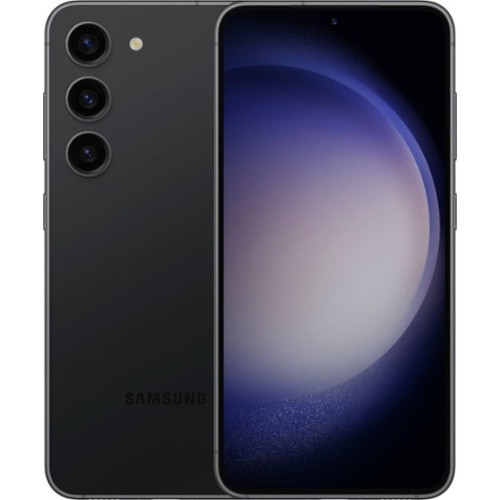
Galaxy S23: a practical Android option
This is our Android starting point for parents who want Family Link and a USB-C phone. Samsung currently includes the S23 in its security-update scope. That is a current support check, not a promise of indefinite updates. Verify your carrier and the exact variant before buying.
iPhone 13 Connected Pack: phone and 3 months of service together
If your child needs a separate line, an eligible Connected Pack can put the phone and service in one purchase: 3 months of Boost Mobile Unlimited Talk, Text & Data at $0*, provided by Plug. Starting month 4, it's $25/mo for life with AutoPay ($30/mo without). Choosing a device-only phone is also an option.
How we choose, and what we do not assume
- We check active storefront availability and select an available variant under $300 USD.
- We check current manufacturer security support and whether the setup guidance applies to that device.
- We favor meaningfully different choices over filling a row with colors of the same phone.
- We verify eSIM support for a Boost-promoted purchase path. Physical-SIM support alone does not qualify.
This is a catalog-and-documentation-based guide. We are not claiming hands-on child-safety testing. Inventory changes; a recommendation disappears when no qualifying variant is available. If you change options after opening the product page, check the new price before adding to cart.
Compare the total cost before choosing service
Ask your current carrier what one extra line would actually add to your bill, including taxes, fees, and effects on existing discounts. Compare that with a separate Boost Mobile line. The $25/month AutoPay price is for one line and should not be presented as a multi-line family discount.
Eligible Connected Packs include Unlimited Talk, Text & Data for the 3 included months, on a new Boost Mobile line with U.S. service. Prefer a physical SIM? Select that option during activation. *Taxes and fees may apply; coverage and speeds vary. Review the current Plug phone-plan offer and the family-plan comparison.
Protect the device and prepare the handoff
A compatible case and screen protector are sensible additions, but do not assume a warranty covers accidental drops or spills. Read Plug's current warranty terms before buying additional protection. Find accessories through Shop by Device.
Then follow the iPhone or Android setup guide and complete the family checklist.
Sources and further reading
- Apple: iPhone 13 specifications
- Samsung: current security-update scope
- Google Family Link: supported family setups
- Plug: phone-plan offer
Source review: September 14, 2026. Menus, app features, and availability can change. Follow the current instructions shown on your device.
Current first-phone picks
Options under $300 USD, before taxes, accessories, and recurring service. Color, storage, and condition are shown for the linked option.
-
Oferta
Samsung Galaxy S23 128GB 5G- Phantom Black (Unlocked)
Save 50%Precio habitual $249.99 USDPrecio de oferta $249.99 USD Precio habitualPrecio unitario / por$499.99 USDView this exact option Device only. Service and accessories sold separately.
Android with Family Link
Oferta
En este momento no hay opciones de iPhone revisadas disponibles por menos de $300 USD. La guía de configuración del iPhone sigue disponible para ayudarte.
Every pick is Certified Pre-Owned: a 90+ Point Inspection, the 12-Month Plug Warranty, and 30-Day Love It or Return It. Choose your condition (Good, Great, Excellent) on the product page.
¿Cuánto costará realmente el primer año?
Compare adding a line to your family plan with a separate Boost Mobile line. Edit any number.
Estimates only. Taxes, fees, and activation costs are not included. Boost Mobile Unlimited is $25/month with AutoPay for one line; 3 months are included in the price of an eligible Connected Pack. Coverage and speeds vary.


